



|
Getting your Trinity Audio player ready...
|
Security researchers from XM Cyber have recently discovered a series of vulnerabilities in Microsoft System Center Configuration Management (SCCM) that could be chained together to achieve remote code execution. Any standard domain user with no SCCM permissions, no admin role, and no user interaction can take advantage of this.
The exploit chain targets the primary site server, which manages the entire infrastructure, effectively granting control over the entire environment should an attacker effectively weaponize the flaw. SCCM is one of Microsoft’s most widely adopted services, used to manage operating system deployment, patch management, software distribution, and compliance monitoring across large fleets of Windows assets. Recent reports from Microsoft cite more than 100 million active users, meaning the potential scope of this is massive.
The XM Cyber team reported multiple vulnerabilities to Microsoft on May 23, and a high-severity CVE (CVE-2026–47301) was assigned for one of them, with fixes implemented by July 14th. The rest of the chain is currently unpatched. Microsoft mentioned that a fix for the rest of the chain will be addressed in upcoming releases, currently planned to be “ConfigMgr 2609” in October, 2026. Until then, companies are still at risk.
Chain Overview: From Domain User to Enterprise Control
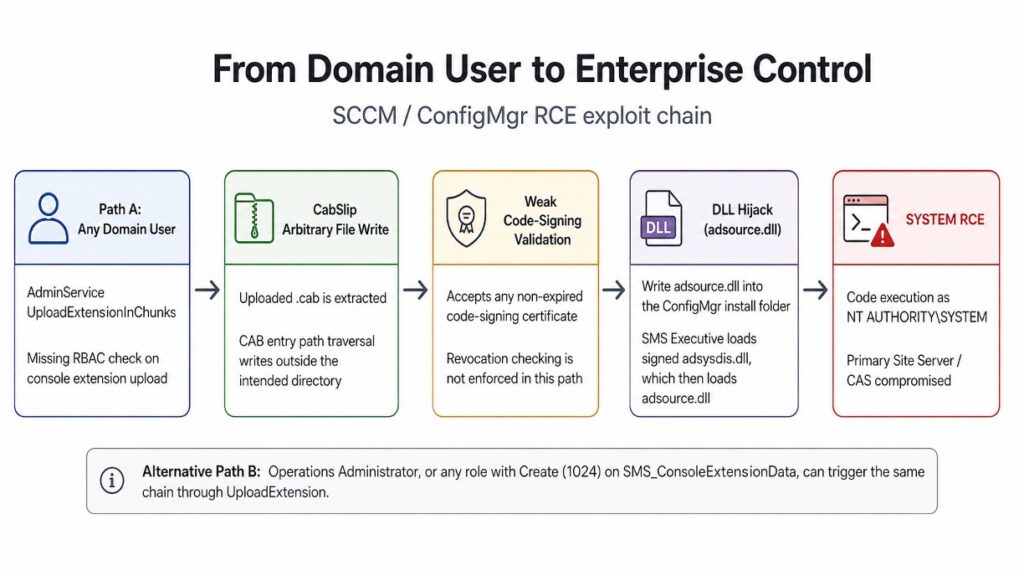
The chain exploits a missing authorization check on an SCCM AdminService upload endpoint, a Zip-Slip-style path traversal in the server’s CAB extraction logic (XM researchers have taken to calling it ‘CabSlip’), a code-signing trust boundary that accepts any $58 certificate, and an automatic privileged DLL loading behavior in SMS Executive.
One HTTP POST from an unprivileged user, and within seconds an attacker has control over the site server.
The remote code execution path is also viable for any SCCM user with the Create permission (bitmask 1024) on the SMS_ConsoleExtensionData object type. The built-in Operations Administrator role ships with this permission by default meaning that even without exploiting the Role-Based Access Control (RBAC) bypass, any user assigned that role can execute the full chain and take over the SCCM Site Server just through a different API.
Microsoft clearly documents that it should not be possible, while saying that this role should not be able to manage administrative users and security aspects:

Microsoft released a fix for this issue that prevents standard domain users from abusing the unauthenticated chunked upload endpoint. While that’s a great first step, that means teams need to shift their focus toward users with Operations Administrator roles, as a complete fix is not expected to be implemented until later this year, in October.
Breaking Down the Chain: Diving Into Each Vulnerability
Vulnerability 1: Broken RBAC in AdminService (CVE-2026–47301)
SCCM exposes an HTTP REST API known as AdminService to manage site functions programmatically. One of its features allows administrators to upload console extension packages via .cab archives.
In ConsoleExtensionMetadataController.cs, Microsoft provided two endpoints to handle extension uploads:
- UploadExtension: Requires explicit RBAC authorization by callingthis.CheckAccess(Guid.Empty, 1024).
- UploadExtensionInChunks: Handles chunked .cab uploads but lacks thethis.CheckAccess()call.
Because the endpoint fails to verify permissions, any authenticated Active Directory user regardless of whether they have been assigned an administrative role within SCCM can send POST requests to UploadExtensionInChunks. This opens the entire attack surface to any standard domain account without requiring any user interaction or admin privileges.
Even if this endpoint is patched, any lower-privileged SCCM user assigned the built-in Operations Administrator role (or a custom role with Create permissions on SMS_ConsoleExtensionData) can call the standardUploadExtension endpoint to trigger the exact same downstream chain.
Vulnerability 2: Weak Code-Signing Verification
To ensure uploaded extension packages are trusted, SCCM includes logic to verify that .cab files carry a valid digital signature before extracting them.
When checking signatures via VerifyExtensionCabSignature, the system calls VerifyEmbeddedSignature with the checkCRL parameter explicitly set to false. This instructs the underlying WinVerifyTrust function to skip Certificate Revocation List checks entirely. Additionally, the validation logic only checks whether the signature is structurally valid and non-expired, without enforcing any trust boundaries meaning it never verifies whether the certificate belongs to Microsoft or the target organization.
Because revoked certificates are ignored and signer identity restrictions are absent, an attacker does not need access to enterprise or vendor certificates. They can simply sign their malicious .cab archive using any standard, commercially purchased code-signing certificate (or an expired/revoked valid certificate), and SCCM will accept the payload as fully trusted.
Vulnerability 3: “CabSlip” Path Traversal in Cabinet Extraction
After passing signature validation, AdminService extracts the .cab contents into a temporary directory to process the console extension files.
During extraction, embedded file names inside the archive are processed by CabinetUtils.GetFileName. While this routine strips root path specifiers, it completely fails to sanitize relative directory traversal sequences. The extraction handler ExtractOpenFileHandler then takes these raw file paths and passes them directly to Path.Combine, appending them directly to the temporary directory path.
By constructing a custom .cab file using standard tools like makecab.exe and defining path traversal sequences in a .ddf directive file, an attacker can force the extraction routine to escape the temporary folder. This provides a full Arbitrary File Write primitive, allowing files to be written or overwritten anywhere on the site server’s file system.
Vulnerability 4: Unsigned Secondary DLL Hijacking in SMS Executive
To convert an arbitrary file write into remote code execution, an attacker must target a location where a high-privilege system process will automatically load and execute the dropped file. On SCCM site servers, the primary background service (SMS Executive) operates under the NT AUTHORITY\SYSTEM account.
Every few minutes, SMS Executive executes adsysdis.dll. While SMS Executive strictly verifies the digital signature of adsysdis.dll before loading it, adsysdis.dll itself statically links to and dynamically loads a secondary library, adsource.dll, from the main Configuration Manager installation directory (e.g.,C:\Program Files\Microsoft Configuration Manager\bin\x64). Crucially, no signature or integrity verification is performed when adsource.dll is loaded.
By leveraging the CabSlip path traversal vulnerability, an attacker can overwrite adsource.dll in the installation directory with a malicious payload. The next time SMS Executive invokes adsysdis.dll, the service automatically loads the attacker’s DLL into memory, executing arbitrary code as NT AUTHORITY\SYSTEM and granting complete control over the site server.
Detection and Remediation: Keeping Your Organization Safe
When it comes to identifying active exploitation, teams should start by monitoring log files on the Site Server, specifically inspecting <InstallationDir>\Logs\AdminService.log.
When an attacker attempts this exploit chain, the AdminService routine extracts the .cab package and eventually attempts to clean up its temporary working folder (ExpandedCab). Because the CabSlip path traversal redirects the extracted files outside of this expected directory, the cleanup process fails and logs aSystem.IO.DirectoryNotFoundException error, immediately followed by an HTTP 500 Internal Server Error response.
Security teams can construct detection rules around this specific log error pattern and monitor for unexpected file modifications, specifically adsource.dll, within the main Configuration Manager installation folder. Effective remediation requires a combination of vendor updates, network isolation, and privilege auditing.
Microsoft released a fix for the broken authorization vulnerability (CVE-2026-47301) in July 2026, which prevents standard domain users from abusing the unauthenticated chunked upload endpoint. To mitigate the remainder of the unpatched chain prior to vendor updates, administrators should restrict network access to the AdminService API port via firewall rules, as disabling the underlying process (SCCMProviderGraph.exe) is not supported by Microsoft.
Finally, organizations must audit internal SCCM RBAC assignments to ensure that the Operations Administrator role or any custom role with Create permissions on SMS_ConsoleExtensionData is strictly restricted, as accounts holding these privileges can still trigger the identical downstream exploit chain.
For more information visit Omri’s Medium article.