


TL;DR
XM Cyber Researcher Hillel Pinto uncovered CVE-2025-34352, a critical vulnerability in the JumpCloud Remote Assist for Windows agent (versions prior to 0.317.0). The flaw allows any low-privileged local user to exploit insecure file operations—arbitrary file write/delete—performed by the agent running as NT AUTHORITY\SYSTEM within the user’s temporary directory. This vulnerability is immediately exploitable to achieve Local Privilege Escalation (LPE) or cause a Denial of Service (DoS). Users must update immediately to version 0.317.0 or later to patch the issue.
The Risk: Agent Turned Attacker
Sometimes, the very tools deployed to secure an enterprise can become the entry point for attackers. That is exactly what our team found while analyzing the JumpCloud agent: a high-severity vulnerability in the agent’s Windows uninstaller that allows any low-privileged user to escalate to full SYSTEM access or crash the machine entirely.
JumpCloud is a global, cloud-based Directory-as-a-Service platform—an identity provider trusted by organizations across 160 countries and used by more than 180,000 businesses. The JumpCloud Agent is deployed on every managed Windows endpoint, operating with maximum privileges (NT AUTHORITY\SYSTEM) to enforce policies and manage the device.
An exploit against this agent translates directly into full, persistent control over the endpoint, posing an immediate threat to corporate assets.
| Property | Details |
| Vulnerability ID | CVE-2025-34352 |
| Severity | High (CVSS v4.0 Score: 8.5) |
| Affected Component | JumpCloud Remote Assist for Windows |
| Affected Versions | All versions prior to 0.317.0 |
| Attack Vector | Local (LPE) |
| Root Cause | Arbitrary File Write/Delete via Improper Link Resolution (CWE-59) in the uninstaller. |
| Impact | SYSTEM Privilege Escalation or Denial of Service (BSOD) |
| Fix | Upgrade to version 0.317.0 or later. |
The vulnerability is rooted in a known security pitfall: a privileged process performing sensitive operations inside a user-controlled, writable directory—in this case, the Windows %TEMP% folder. This mistake allowed attackers to use symbolic link and mount-point tricks to redirect the JumpCloud uninstaller—running as NT AUTHORITY\SYSTEM—toward protected system files.
Technical Breakdown: From Low-Privilege to SYSTEM
Phase 1: Finding an entry point
While searching for functions that interact with untrusted paths or processes, I found internal logic related to the uninstallation of JumpCloud Remote Assist, triggered during the removal of the main JumpCloud Agent.
Key Findings:
- The agent builds the full path to the Remote Assist folder dynamically based on environment variables.
- It looks for the uninstaller binary within the folder.
- It executes the binary.
So every uninstallation of the main JumpCloud agent will also uninstall all the other components including JumpCloud Remote Assist.
Let’s start exploring our functions.
The symbols are stripped but we can recover function names using Go’s internal pclntab metadata – see Ready, Set, Go — Golang Internals and Symbol Recovery | Google Cloud Blog. This data is embedded in the binary and allows us to map function addresses back to their original names.
Using this technique we can go from:
 jumpcloud-agent.exe symbols stripped
to:
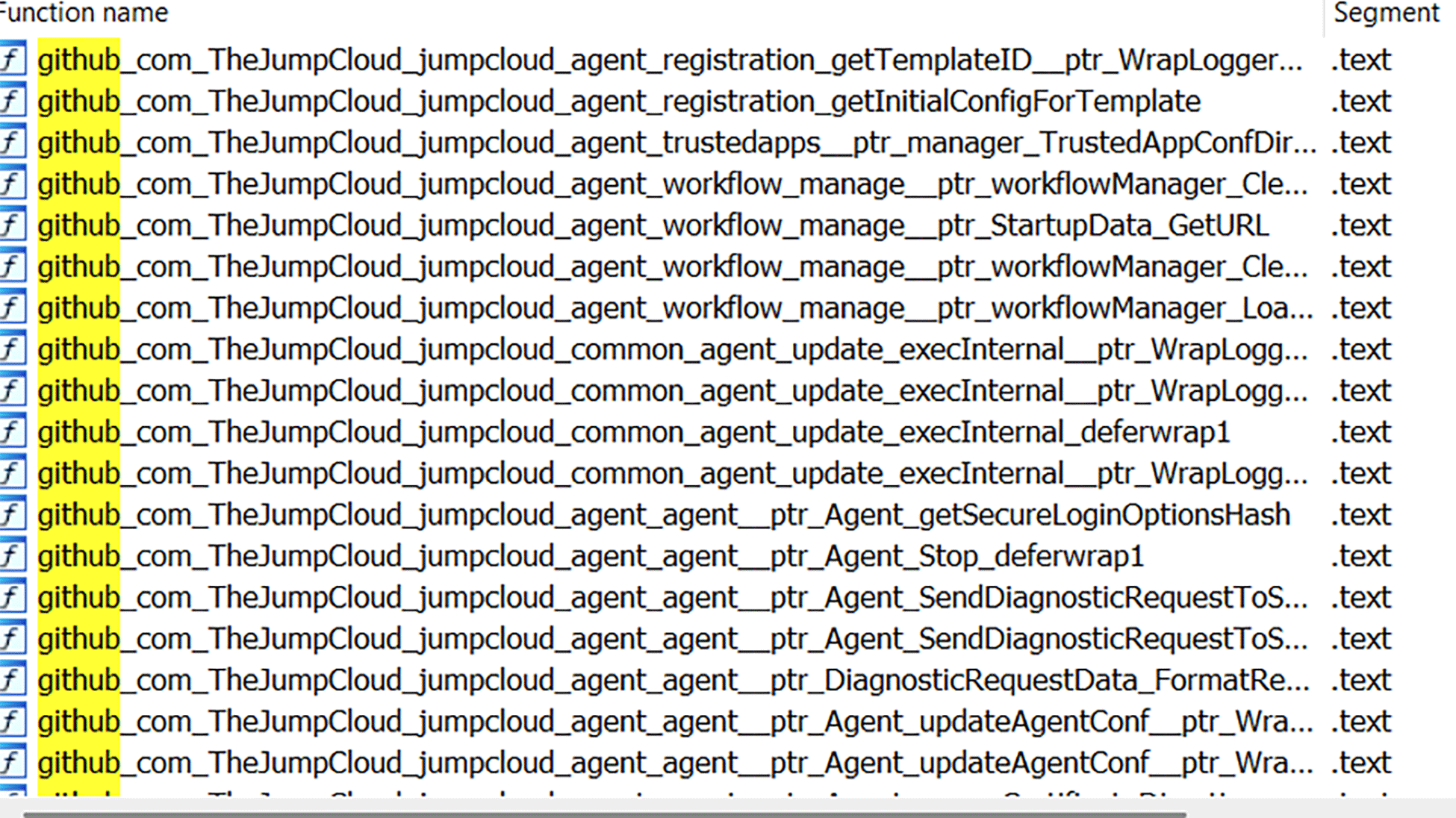 jumpcloud-agent.exe symbols restored
The following screenshot displays the functionality of a specific routine, assist_GetExecutablePath()
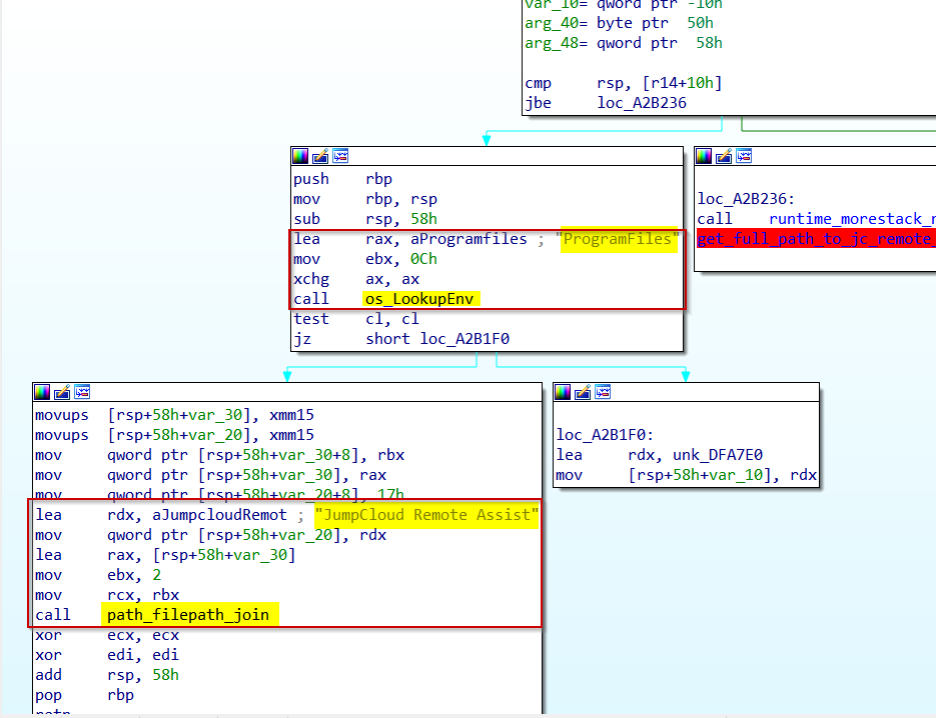 Building full path to JumpCloud Remote Assist folder
The code constructs a file path by combining the Windows %ProgramFiles% environment variable with the hardcoded string “JumpCloud Remote Assist” to target files in that specific application directory.
The function above is called by a function named assist_GetUninstallerPath()
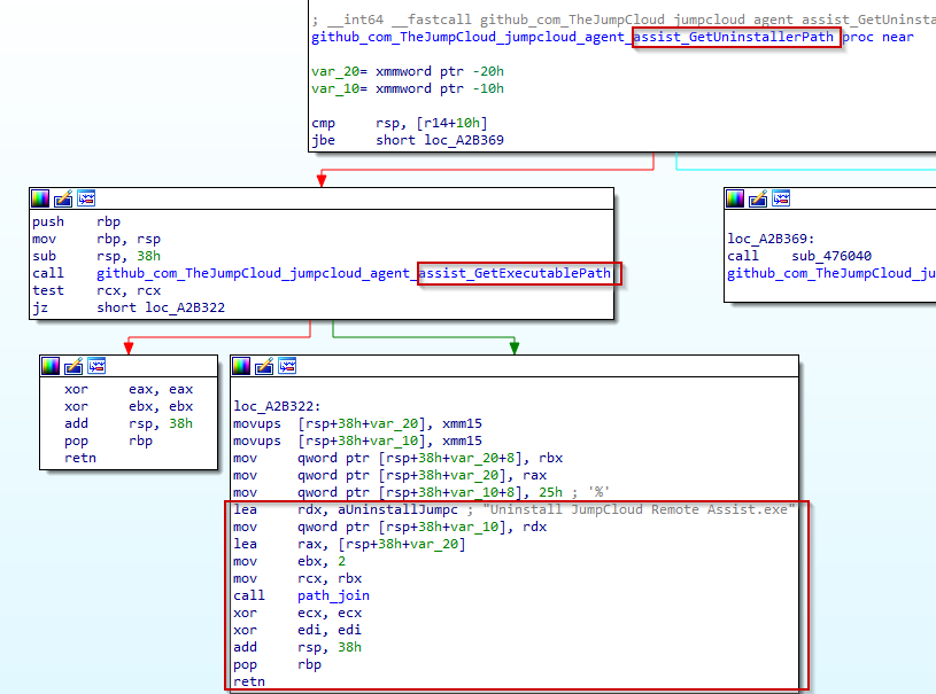 Creating complete path to JumpCloud Remote Assist Uninstaller’s binary
The two functions combine the JumpCloud Remote Assist program directory path with the hardcoded uninstaller filename “Uninstall JumpCloud RemoteAssist.exe” to create the complete path to the uninstaller executable.
 Uninstaller’s binary location
Let’s understand now where this path is needed and expected by the jumpcloud-agent.exe process.
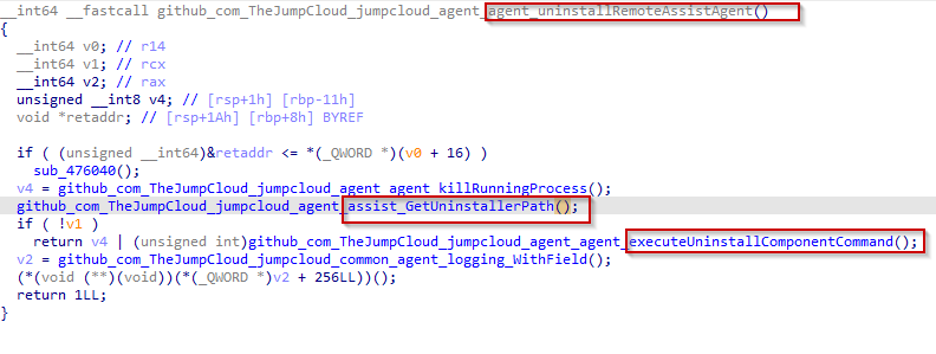 Execution of uninstaller’s binary
Okay, we got a hit; the JumpCloud Remote Assists’s uninstaller path is requested in a function named agent_uninstallRemoteAssistAgent(), the function’s name is self explanatory.
We can clearly see that once the path to the uninstaller is built successfully, the jumpcloud-agent.exe process will execute it, and this starts to feel like a promising lead.
Now again, let’s see where this last function agent_uninstallRemoteAssistAgent() is called.

The function is called only in one place by a function named Agent_Uninstall() and here’s how it is implemented:
 Main caller to the remote assist component uninstallation
The whole flow looks like the following:
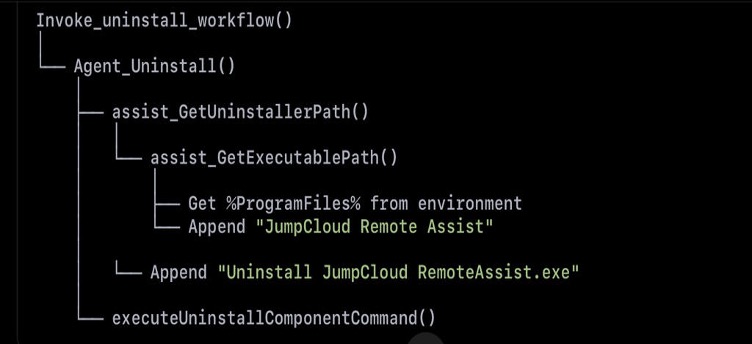
From this we can clearly trace the execution flow:
- When the main agent is uninstalled, it also triggers the uninstallation of Remote Assist component.
- This is done as NT AUTHORITY\SYSTEM, since the call originates from the jumpcloud-agent.exe process.
Analyzing JumpCloud Remote Assist Uninstaller
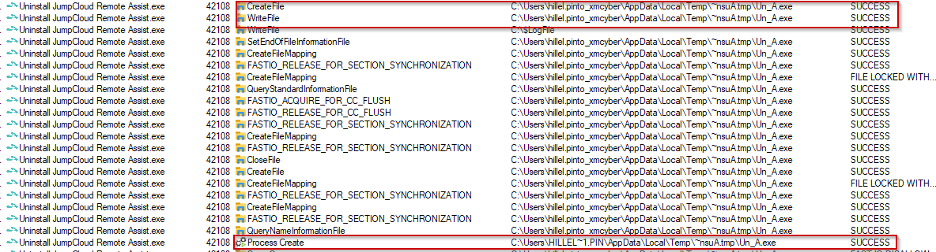
Here’s the interesting part of a snapshot of what’s being executed when running the JumpCloud Remote Assist Uninstaller.
- The process will check if file Un_A.exe under
%TEMP%/~nsuA.tmpexists and here’s the operation’s flow:- Existent?
DeleteFileW(Un_A.exe)→WriteFile→ Execute the file (CreateProcessW). - Not existent? Create it (
CreateFile) →WriteFile→ Execute the file (CreateProcessW).

Flow when Un_A.exe does not exist - Existent?
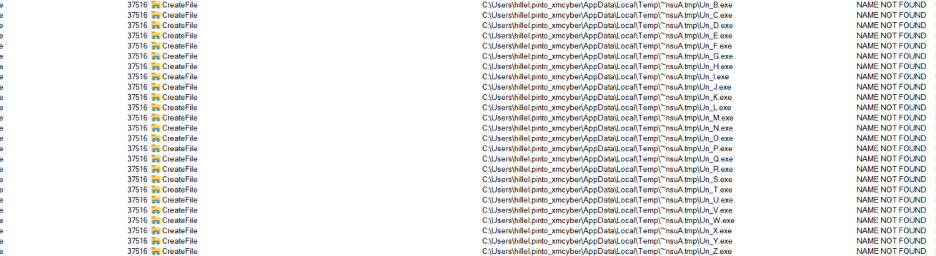
- The process deletes any file from Un_B.exe to Un_Z.exe (if existent) from the
%TEMP%\~nsu.tmpAdirectory.This is the operations when the files do not exist:

Un_*.exe files inexistent in directory
This is the operations when one of these files (Un_B.exe in the example) exists:
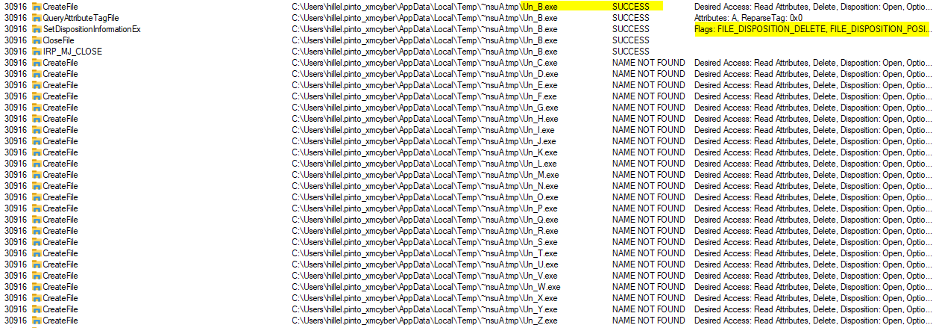
So what we have is a JumpCloud process with NT AUTHORITY\SYSTEM privileges that is deleting, writing, and executing a file with a predictable filename from an untrusted path.
Now let’s see how we can exploit it.
Phase 2: Exploiting the Primitives
The core of the exploit involves Link Following, utilizing mount points and symbolic links to redirect the privileged I/O operation.
1. Arbitrary File Write → Denial of Service (DoS)
The write primitive allows an attacker to write arbitrary data to any file, including critical system drivers, using a Mount Point/Object Manager namespace attack (bypassing the need for SeCreateSymbolicLinkPrivilege).
| Attack Step | Technical Action | Impact |
| Setup | Low-privileged user creates a mounting point from %TEMP%\~nsuA.tmp to the \RPCControl object directory. | Establishes redirection channel. |
| Redirect | Create a pseudo-symlink from ~nsuA.tmp\Un_A.exe to a critical system file: C:\Windows\System32\cng.sys (Cryptographic Next Generation driver). | Forces the SYSTEM write operation to the driver file. |
| Trigger | Launch the JumpCloud uninstallation. | The SYSTEM process corrupts cng.sys. |
| Result | Infinite Blue Screen of Death (BSOD), effectively crashing the machine until manual repair. |
2. Arbitrary File Delete → Local Privilege Escalation (LPE)
The delete primitive is exploited via a classic Time-of-Check to Time-of-Use (TOCTOU) race condition combined with a Windows Installer LPE technique (targeting C:\Config.Msi).
| Attack Step | Technical Action | Impact |
| Lock | Set an Oplock on the LPE target file. | Pauses the delete operation. |
| Link | Create a symlink from Un_A.exe to the target folder’s Alternate Data Stream (ADS): C:\Config.Msi::INDEX\_ALLOCATION. | Prepares the arbitrary folder deletion. |
| Trigger & Race | Execute the uninstaller; when the Oplock is released, the uninstaller’s DeleteFileW() call is redirected by the symlink. | The SYSTEM process deletes the entire protected C:\Config.Msi folder. |
| Result | Attacker replaces C:\Config.Msi content and triggers the Windows Installer, leading to a full NT AUTHORITY\SYSTEM shell. |
This vulnerability is a stark reminder that “classic” security flaws in agent technology remain a high-fidelity path to full host compromise.
Responsible Disclosure and Mitigation
My team and I responsibly disclosed the vulnerability to JumpCloud, which confirmed the findings and promptly released a patch.
Patch Availability: JumpCloud Remote Assist for Windows version 0.317.0 and later remediate this issue.
Final Recommendations for Security Teams
- Patch Immediately: Verify that all Windows devices running the JumpCloud Agent are updated to version 0.317.0 or later.
- Harden Agents: For vendor risk assessment, confirm that no privileged process executes arbitrary code, reads, or writes to a user-writable directory (like %TEMP%) without explicitly setting or overriding the folder’s Access Control Lists (ACLs).
Note: The XM Cyber Vulnerability Risk Management (VRM) module continuously assesses CVE-2025-34352 across your entire network.